Performance Testing of HDDs, SSDs, and NVMe SSDs Using fio
21 Jul 2026, 15:00:13
The fio (Flexible I/O Tester) utility is used to measure the actual performance of disk devices in Linux-based operating systems. It is currently the industry standard among system administrators. The utility performs two actions: it simulates real-world load on a specified device and measures the necessary metrics.Using fio, you can simulate various types of load:
- Random read or write
- Sequential reading or writing
- Multithreading
- A mixed load in a specified ratio
Installing fio
The fio utility has long enjoyed a good reputation and is included in the system repositories of many Linux distributions. All commands in this article are executed on a dedicated server provided by Virterion.com as the root user. If you are logged in as a regular user, you may need to use sudo to run the commands.Debian и Ubuntu
apt install fioRHEL, AlmaLinux, Rocky Linux
dnf install fioArch Linux
pacman -S fioFreeBSD
pkg install fioChecking the installed version:
fio --version
Running Tests
The advantage of fio is that we can specify the type and intensity of the load ourselves. Now we'll look at some test options, including verifying that the drive meets the manufacturer's specified specifications.First, you need to create a directory where the utility will save the files it needs to work with. This directory must be located on the disk being tested. You can create it using the standard command:
mkdir /fioRandom Reading
Many manufacturers list four types of performance metrics that a device meets: the maximum number of random read and write operations, and the sequential read and write speeds. Let's start with the first one, since for a production server, it is often the number of IOPS that is the bottleneck.Manufacturer-Specified Specifications:
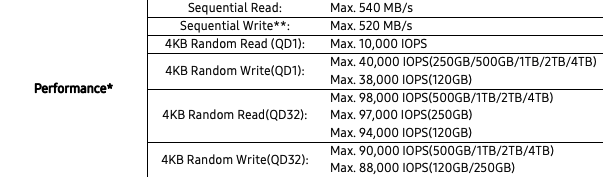
The command with the same parameters (4k block size, random read, 32 request queue):
fio --name=4k-rnd-read --rw=randread --directory=/fio --direct=1 --bs=4k --ioengine=libaio --iodepth=32 --runtime=60 --numjobs=1 --time_based --size=5G- --name=4k-rnd-read - test name
- --rw=randread - test type (randread - random reading)
- --directory=/fio - working directory
- --direct=1 - direct disk access, bypassing the system cache
- --bs=4k - block size
- --ioengine=libaio - mechanism for interacting with the system kernel
- --iodepth=32 - queue depth
- --runtime=60 - time allotted for the test
- --numjobs=1 - number of test threads
- --time_based - end the test after the specified time has elapsed
- --size=5G - test file size
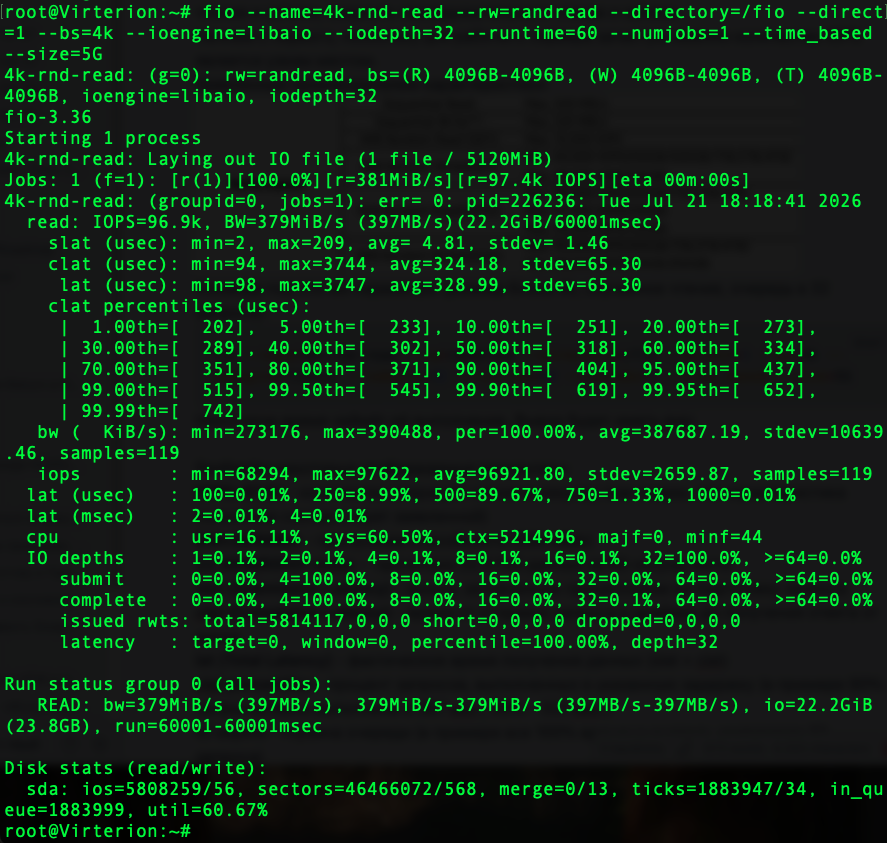
Let's take a look at some of the results displayed:
| IOPS=96.9k | number of read operations per second (as we can see, this specification matches the advertised value exactly) |
| BW=379MiB/s | throughput (397 MB/s) |
| 22.2GiB/60001msec | 22.2 GiB of data were read during the 60-second test |
| slat (Submission Latency) | the time the processor spent preparing the request |
| clat (Completion Latency) | the time from sending a request to the driver until receiving a response from the disk |
| lat (Total Latency) | actual time of data receipt (slat + clat) |
| clat percentiles | the percentage of requests completed within the specified latency (in the example, 90% of requests were completed in 404 µs, and 50% in 318 µs) |
| IO depths | queue depth (in this example, the queue consisted of 32 requests 100% of the time) |
| Disk stats (read/write) | statistics from the operating system itself |
| ios=5808259/56 | number of read/write operations performed |
| ticks=1883947/34 | total read/write time |
| util=60.67% | disk utilization (percentage of time the disk was active)) |
Random entry
Command for testing random writing:fio --name=4k-rnd-write --rw=randwrite --directory=/fio --direct=1 --bs=4k --ioengine=libaio --iodepth=32 --runtime=60 --numjobs=1 --time_based --size=5G- --name=4k-rnd-write - test name
- --rw=randwrite - test type (randwrite - random entry)
- --directory=/fio - working directory
- --direct=1 - direct disk access, bypassing the system cache
- --bs=4k - block size
- --ioengine=libaio - mechanism for interacting with the system kernel
- --iodepth=32 - queue depth
- --runtime=60 - time allotted for the test
- --numjobs=1 - number of test threads
- --time_based - end the test after the specified time has elapsed
- --size=5G - test file size
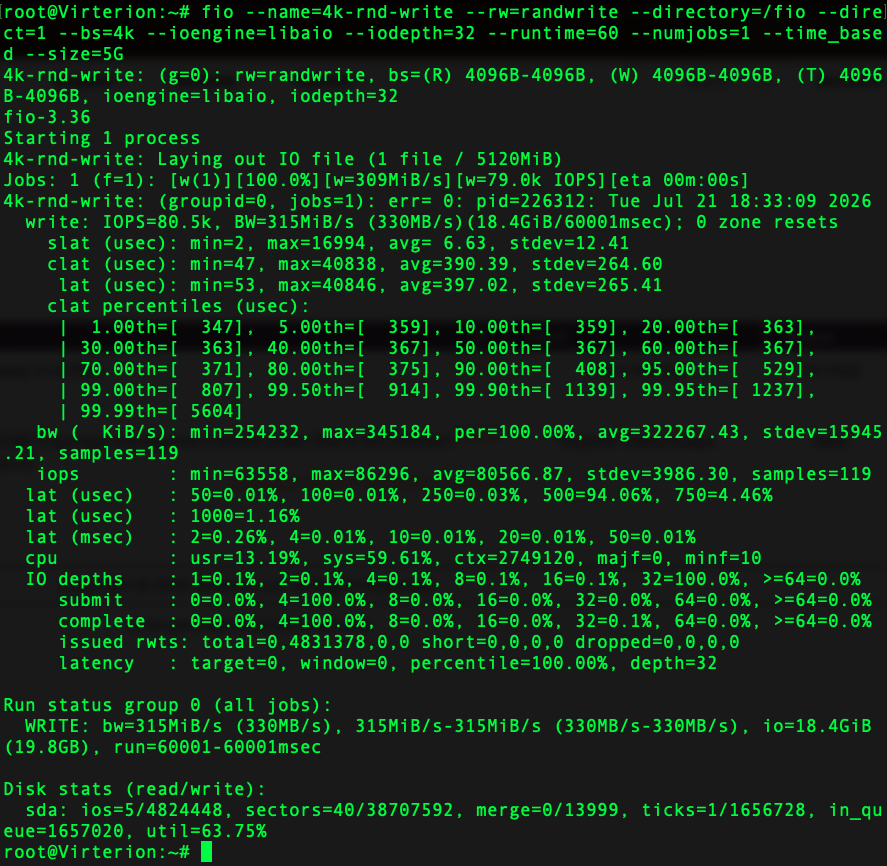
Key metrics:
| IOPS=80.5k | number of write operations per second |
| BW=315MiB/s | write speed (330 МБ/с) |
| 18.4GiB/60001msec | 18.4 GiB written in 60 seconds |
| slat | the time it takes for the processor to prepare the request |
| clat | delay caused by the disk itself processing the request |
| clat percentiles | what percentage of requests were processed during a given period |
| IO depths | queue depth (in this example, the queue consisted of 32 requests 100% of the time) |
Other metrics, latency and device utilization, are quite typical for a SATA SSD in this class.
Sequential Reading
Sequential read and sequential write tests are used to measure a storage device's maximum linear speed and throughput. The command to run the sequential read test is:fio --name=seq-read --rw=read --directory=/fio --ioengine=libaio --bs=1M --size=5G --iodepth=32 --numjobs=1 --direct=1 --runtime=60 --time_based- --name=seq-read - test name
- --rw=read - test type (read - sequential reading)
- --directory=/fio - working directory
- --direct=1 - direct disk access, bypassing the system cache
- --bs=1M - block size
- --ioengine=libaio - mechanism for interacting with the system kernel
- --iodepth=32 - queue depth
- --runtime=60 - time allotted for the test
- --numjobs=1 - number of test threads
- --time_based - end the test after the specified time has elapsed
- --size=5G - test file size
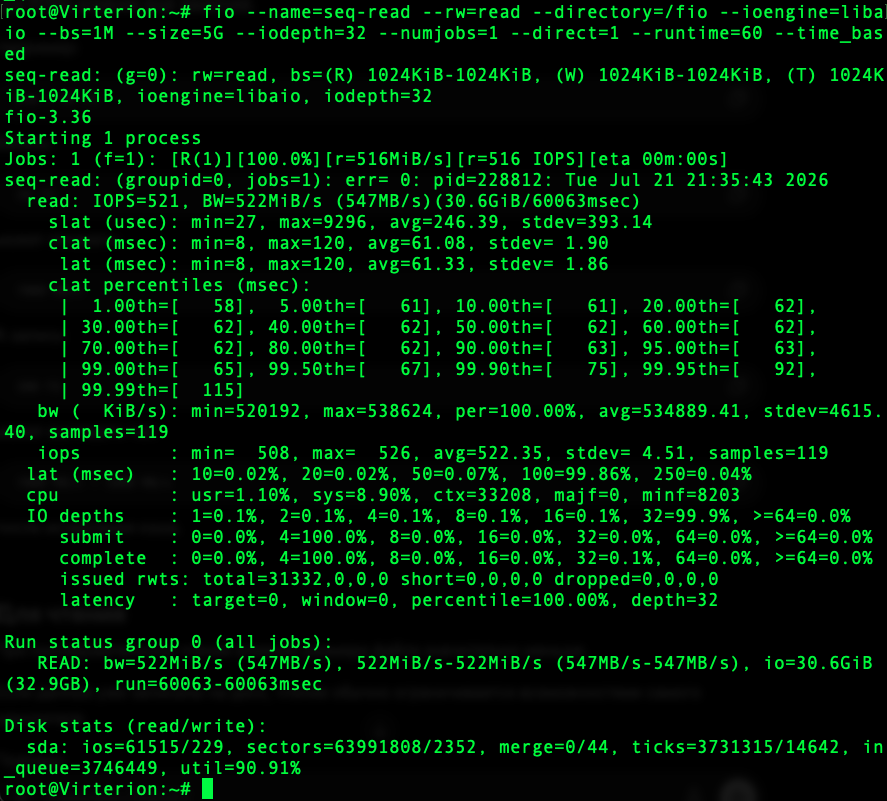
Key metrics:
| IOPS=521 | number of read operations per second during the test |
| BW=522MiB/s | reading speed (547 MB/s) |
| 30.6GiB/60063msec | 30.6 GiB read in 60 seconds |
| clat | execution delay |
| clat percentiles | what percentage of requests were processed during a given period |
| ios=61515/229 | number of read/write operations |
| ticks=3731315 | The disk was active for ~3.73 seconds |
| in_queue=3746449 | total time in line |
| util=90.91% | disk wear during the test |
Sequential Writing
Command for testing sequential write speed:fio --name=seq-write --rw=write --directory=/fio --bs=1M --ioengine=libaio --size=5G --iodepth=32 --numjobs=1 --direct=1 --runtime=60 --time_based- --name=seq-write - test name
- --rw=write - test type (write - sequential writing)
- --directory=/fio - working directory
- --direct=1 - direct disk access, bypassing the system cache
- --bs=1M - block size
- --ioengine=libaio - asynchronous I/O
- --iodepth=32 - queue depth
- --runtime=60 - time allotted for the test
- --numjobs=1 - number of test threads
- --time_based - end the test after the specified time has elapsed
- --size=5G - test file size
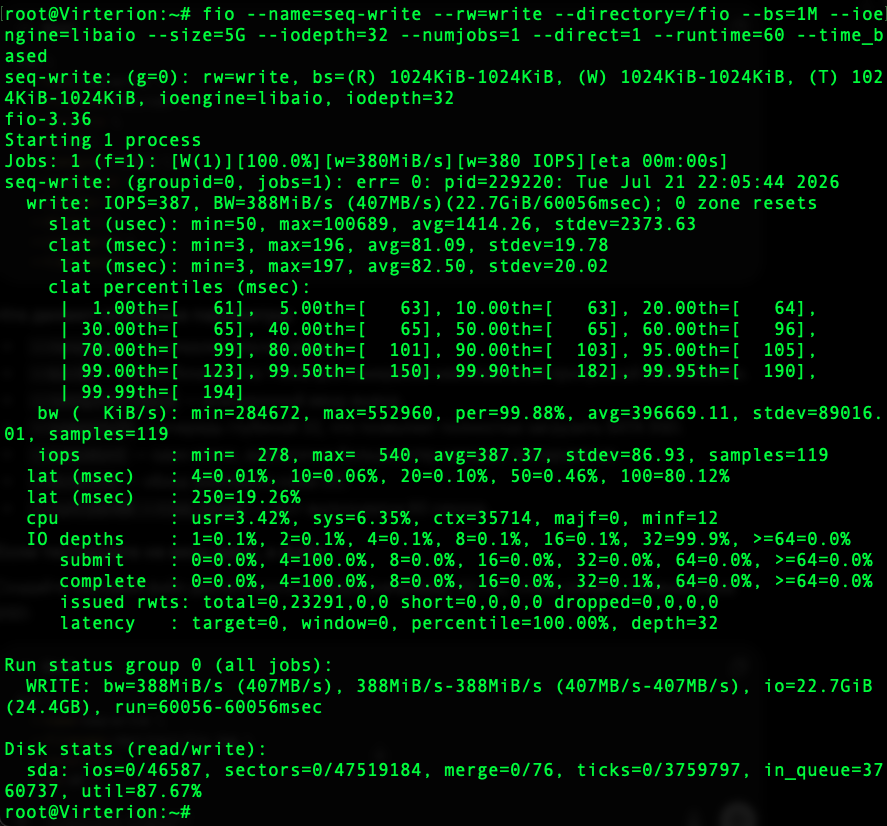
All the fields and their values are the same as in the sequential read test. The most interesting metric is the write speed itself (407 MB/s). It differs significantly from the advertised speed (520 MB/s), but there’s a reason the manufacturer included two asterisks next to this specification:

Generally speaking, a sequential write speed of 407 MB/s is a good figure for a SATA SSD in this class.