Network bandwidth and data transfer speed
29 Aug 2026, 13:04:46
Key concepts
Network bandwidth is the maximum amount of data that can be transmitted over a network within a given period of time. It is usually measured in bits per second: Mbps (megabits per second) or Gbps (gigabits per second).Data transfer speed is the actual amount of information transmitted over a network connection per unit of time. The actual speed does not always correspond to the maximum bandwidth of the connection.
For example, a connection with a bandwidth of 1 Gbps may actually transfer data at 500 Mbps due to network load, hardware limitations, packet loss, or routing conditions.
When evaluating network speed, it is important to distinguish between bits and bytes. One byte contains 8 bits, so a speed of 80 Mbps theoretically corresponds to approximately 10 MB/s when transferring files.
Factors affecting data transfer speed
The actual network performance can be affected by various factors:- network and network equipment utilization;
- performance of the router, server, or computer;
- connection type — wired or Wi-Fi;
- distance and route quality to the remote server;
- packet loss and data retransmissions;
- limitations imposed by the Internet service provider or remote server;
- number of simultaneous connections and network streams.
Measuring speed with Speedtest
Speedtest is widely used for a quick check of an Internet connection. It allows you to measure:- Download — the speed at which data is received;
- Upload — the speed at which data is transmitted;
- Ping/Latency — the delay between the user's device and the test server.
A simple test:
speedtest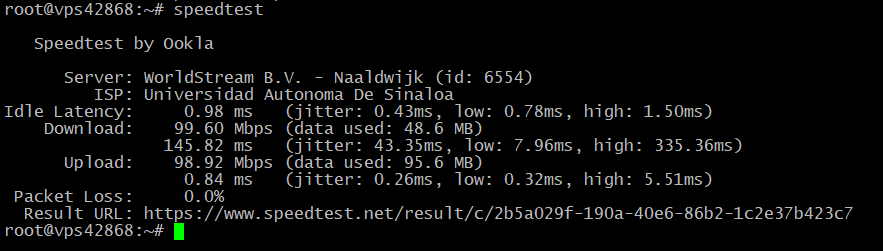
If you need to select a specific test server, you can first retrieve a list of available servers:
speedtest --servers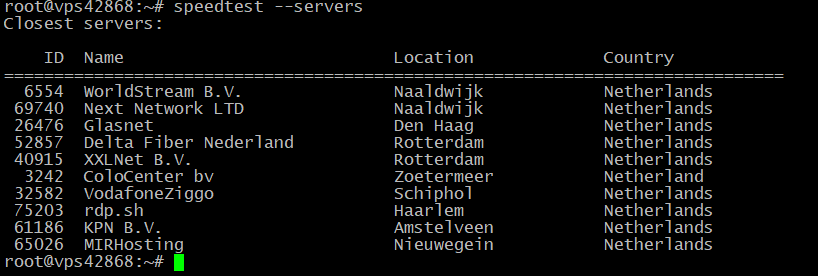
The test can then be performed by specifying the server ID:
speedtest --server-id=69740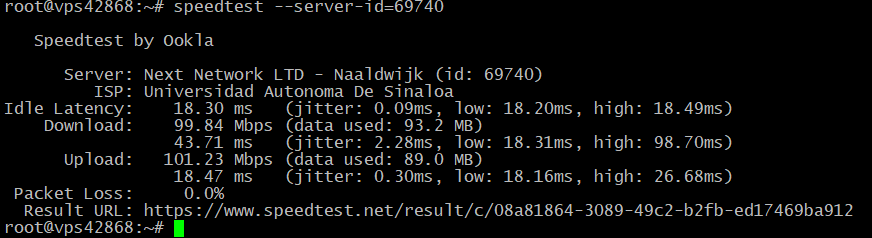
For a more objective assessment, it is recommended to perform several tests against different servers and compare the results. If the speed is approximately the same across several independent endpoints, the results provide a more accurate indication of the available Internet bandwidth.
When using the command line, it is also important to consider the version of the software. Older or third-party Speedtest CLI implementations may use outdated testing methods and produce results that differ from those obtained using modern official services.
Measuring bandwidth with iPerf3
iPerf3 is commonly used for technical network diagnostics. Unlike Speedtest, it allows you to measure bandwidth directly between two specific devices or servers.Start the server on the first device:
iperf3 -sOn the second device, start the client, where SERVER_IP is the IP address of the first server:
iperf3 -c SERVER_IPBy default, the test runs for 10 seconds and displays the average transfer speed.
For a longer test, you can specify the test duration:
iperf3 -c SERVER_IP -t 30To test the connection in the reverse direction, use the -R option:
iperf3 -c SERVER_IP -RiPerf3 also supports multiple parallel streams. For example:
iperf3 -c SERVER_IP -P 4 -t 30This can be useful when a single TCP stream is unable to fully utilize the available bandwidth.
To test a UDP connection and packet loss, use:
iperf3 -c SERVER_IP -u -b 100M -t 30During UDP testing, it is important to pay attention not only to the transfer speed but also to packet loss and jitter — variations in packet delivery latency.
Speedtest vs. iPerf3: key differences
| Characteristic | Speedtest | iPerf3 |
|---|---|---|
| Purpose | Testing Internet access | Testing a connection between two endpoints |
| Ease of use | High | Requires technical knowledge |
| Test configuration | Limited | Flexible |
| TCP and UDP | Depends on the implementation | Supported |
| Packet loss testing | Limited | Supported for UDP |
| Network diagnostics | General assessment | Detailed diagnostics |
| Requires a second server | No | Yes |
Speedtest shows the quality of Internet access and the transfer speed to external test servers. iPerf3 allows you to test the performance of a specific network connection between two known endpoints and is better suited for technical diagnostics.
How to interpret the results correctly
If Speedtest shows a low speed while iPerf3 between two servers shows normal bandwidth, the problem may not be directly related to the server or its network interface. It may instead be caused by the route to the test server or by an issue within the provider's network.If iPerf3 shows low bandwidth directly between two servers, you should additionally check:
- network interface utilization;
- errors and packet loss;
- MTU;
- CPU utilization;
- virtual network adapter configuration;
- virtualization limitations;
- network equipment and the route between the servers.
Conclusion
Bandwidth represents the potential capacity of a network connection, while data transfer speed reflects its actual performance at a specific point in time.Actual network speed is affected by many factors, so the results of a single test do not always provide a complete picture.
For a quick assessment of an Internet connection, Speedtest is convenient, especially when measurements are performed against several test servers. For troubleshooting network issues and checking bandwidth between specific devices, iPerf3 is more suitable.
Using both tools provides a more objective assessment of network performance and helps determine whether low speed is related to the Internet connection, a specific route, the server, network equipment, or other limitations.