What to Do If MySQL Uses All Available RAM
14 Oct 2026, 10:26:29
If MySQL or MariaDB uses almost all available RAM, the server may become slow, the website may intermittently stop responding, and database processes may be terminated due to insufficient memory.Possible causes include excessively large MySQL parameter values, a large number of simultaneous connections, resource-intensive SQL queries, database configuration issues, or insufficient RAM.
This article explains how to identify the cause of high RAM usage, check system logs, and optimize MySQL/MariaDB settings.
1. Checking RAM Usage
First, check the total amount of RAM and its current usage:free -hExample output:
Pay attention to the available column. It shows approximately how much memory is available to applications, taking into account the possibility of reclaiming some cached memory.
If very little memory is available and the system is actively using swap, the server may be experiencing memory pressure. However, high memory usage alone does not necessarily indicate a problem: MySQL may use RAM to cache data and indexes.
Check which processes consume the most memory:
ps aux --sort=-%mem | head -15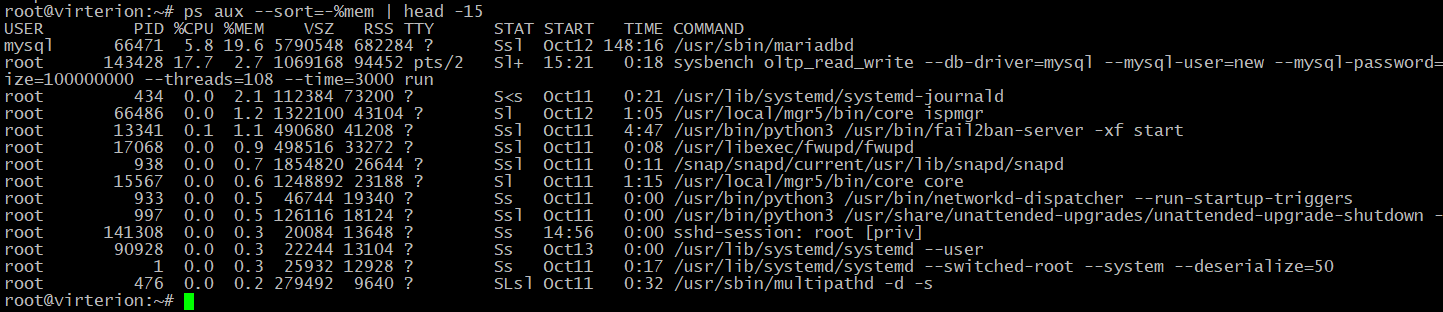
To view processes in real time, use:
topIn top, press M to sort processes by memory usage.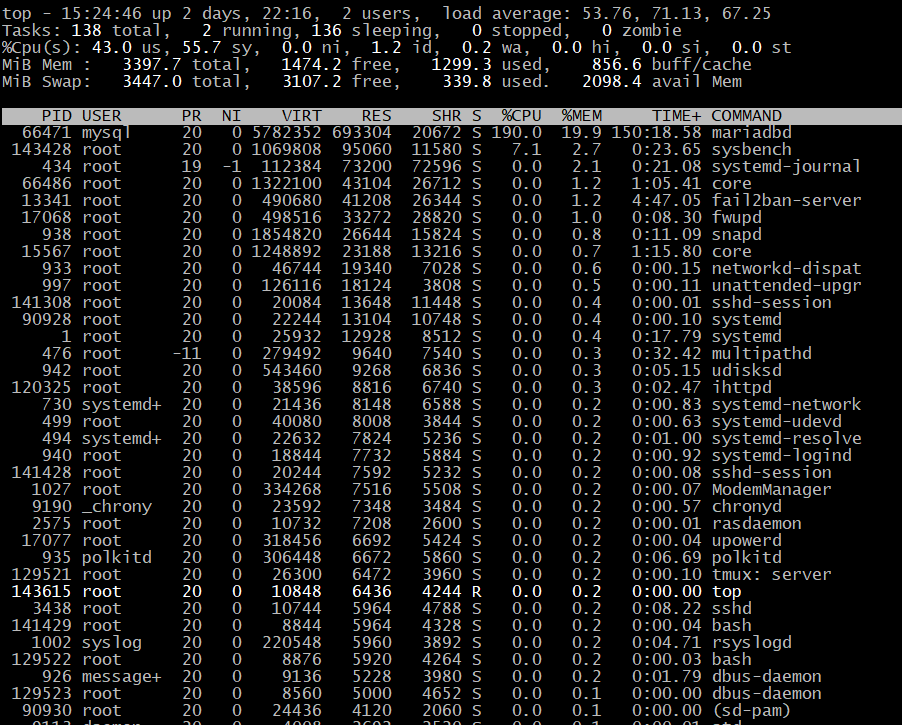
If htop is installed, you can use it instead:
htopFind the mysqld or mariadbd processes. If they appear near the top of the list, check the database configuration and current workload.Also account for memory used by other applications, such as PHP-FPM, Nginx, Redis, and containers.
2. Checking Logs for Out-of-Memory Errors
Linux may forcibly terminate a MySQL process if the system runs out of RAM. This mechanism is called the OOM Killer.Check kernel messages:
dmesg -T | grep -iE 'out of memory|oom|killed process'Also check the systemd journal:journalctl -k --since "24 hours ago" | grep -iE 'out of memory|oom|killed process'If the output contains messages such as:Out of memory: Killed process 1234 (mysqld)This means the kernel terminated the process due to insufficient memory. However, to determine the cause, examine the surrounding log messages, which may contain information about available memory and other processes.
Check the service status:
systemctl status mysqlOn systems using MariaDB, the service may have a different name:systemctl status mariadbImportant: the absence of OOM messages does not mean there is no memory problem. Logs may be incomplete, older entries may no longer be available, and container or cgroup memory limits may cause processes to be terminated without obvious RAM exhaustion across the entire server.If MySQL consumes almost all available memory but does not terminate, the problem may manifest only as reduced server performance.
3. Checking the MySQL/MariaDB Configuration
The main database configuration parameters are usually defined in the following files:- /etc/mysql/my.cnf
- /etc/mysql/mysql.conf.d/mysqld.cnf
- /etc/my.cnf
- /etc/my.cnf.d/
To view the default configuration file search paths, run:
mysql --help 2>/dev/null | grep -A 1 "Default options"
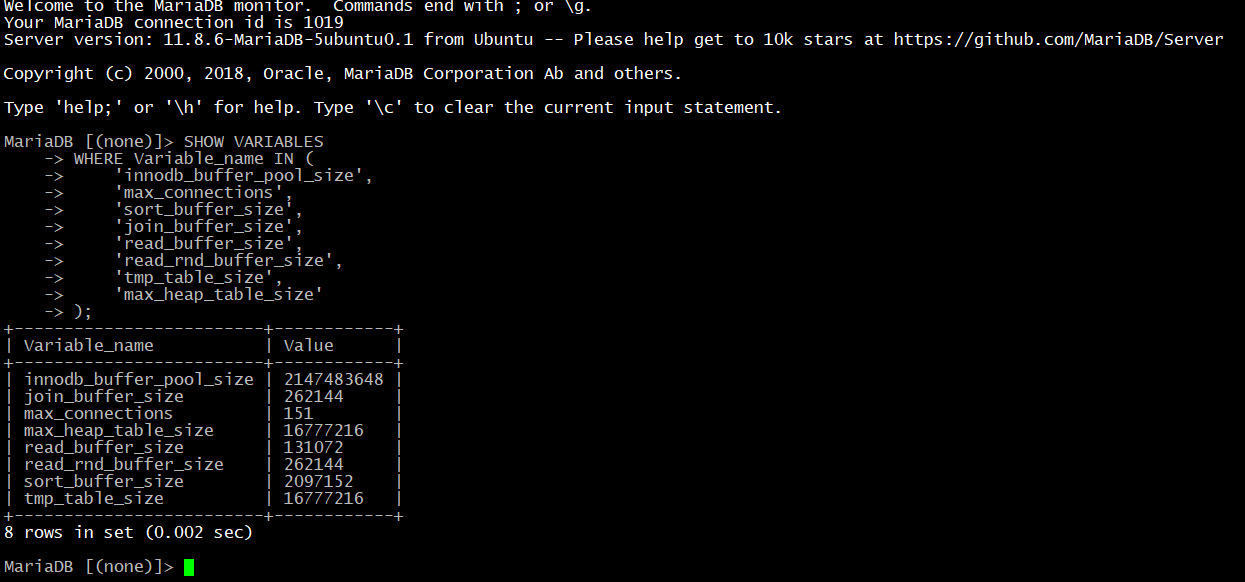
To check the parameters of a running server, connect to MySQL/MariaDB:
mysql -u root -pAfter entering the password, execute the following SQL query:SHOW VARIABLES
WHERE Variable_name IN (
'innodb_buffer_pool_size',
'max_connections',
'sort_buffer_size',
'join_buffer_size',
'read_buffer_size',
'read_rnd_buffer_size',
'tmp_table_size',
'max_heap_table_size'
);
Parameters That Affect Memory Usage
| Parameter | Purpose |
|---|---|
| innodb_buffer_pool_size | Size of the InnoDB buffer pool used to cache data and indexes |
| max_connections | Maximum number of simultaneous connections |
| sort_buffer_size | Buffer used for sorting operations |
| join_buffer_size | Buffer used for certain JOIN operations |
| read_buffer_size | Sequential read buffer |
| read_rnd_buffer_size | Buffer used to read rows in a specific order |
| tmp_table_size | Size limit for internal temporary tables in memory, subject to the applicable mechanisms |
| max_heap_table_size | Maximum size of MEMORY tables |
However, you cannot simply add up all parameter values and treat the result as the exact amount of memory required. Actual consumption depends on the database version, the number of active operations, the configuration, and the characteristics of the queries.
4. Optimizing the InnoDB Buffer Pool
The innodb_buffer_pool_size parameter defines the amount of memory InnoDB uses to store cached data and indexes.Check its current value:
SHOW VARIABLES LIKE 'innodb_buffer_pool_size';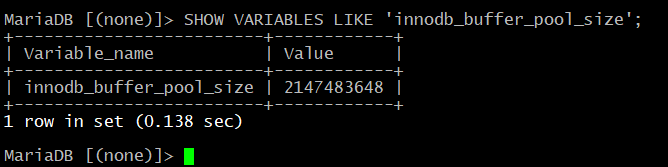
If the server is primarily dedicated to MySQL, the buffer pool can occupy a substantial portion of its RAM. However, on a server running a website, PHP-FPM, Nginx, and other applications, you must leave enough RAM for the remaining processes.
For example, on a server with 8 GB of RAM and several additional services, an initial value of 2–3 GB may be worth considering if diagnostics confirm that the current setting is too large. This is only an example, not a universal recommendation.
Open the MySQL configuration file and add the parameter to the [mysqld] section, or modify its existing value:
[mysqld]Before making changes, check the current configuration and create a backup of the file.
innodb_buffer_pool_size = 2G
A service restart may be required after changing the configuration.
For MySQL:
systemctl restart mysqlFor MariaDB:systemctl restart mariadbRestarting the service will interrupt existing database connections, so schedule it according to the website's workload and the availability of a maintenance window.In some MySQL versions, the buffer pool size can be changed dynamically. Whether this is supported and which values are allowed depend on the version and configuration.
For example, on versions that support this operation, you can run:
SET GLOBAL innodb_buffer_pool_size = 2147483648;The value is specified in bytes and corresponds to 2 GiB.Changes made through SET GLOBAL generally do not persist after a restart. To apply the setting permanently, update the configuration file. Supported MySQL versions may also provide SET PERSIST; check its availability and behavior in your specific version before using it.
5. Limiting the Number of Connections
A large number of simultaneous connections can increase memory consumption, especially when resource-intensive queries are running.Check the maximum number of connections:
SHOW VARIABLES LIKE 'max_connections';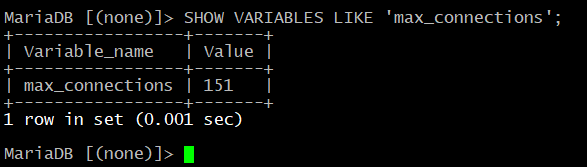
Check the current number of connections:
SHOW STATUS LIKE 'Threads_connected';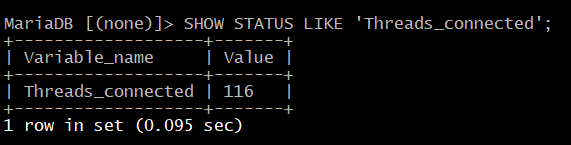
Find the maximum number of simultaneous connections recorded:
SHOW STATUS LIKE 'Max_used_connections';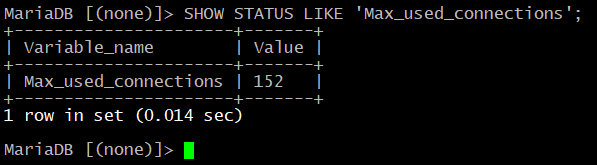
Max_used_connections shows the historical maximum since the server started or the relevant statistics were reset. This metric helps assess peak load but does not guarantee that future peaks will be similar.
For example, if max_connections is set to 500 and the historical maximum is 40, you may consider reducing the limit. However, first check the observation period, workload peaks, and application requirements.
To change the setting in the configuration file:
[mysqld]The value of 150 is an example, not a universal recommendation.
max_connections = 150
On versions that support changing this parameter dynamically, you can update it without restarting the service:
SET GLOBAL max_connections = 150;The change applies to the running server but generally does not persist after a restart unless you update the configuration file or use a supported parameter-persistence mechanism.Reducing the limit will not resolve the underlying cause of resource-intensive queries and may result in connection errors if the actual workload exceeds the new limit.
If there are many connections, also check whether the application uses a connection pool and properly closes unused connections.
6. Checking Active Queries
If MariaDB consumes a large amount of memory, check which queries are currently running. Sorting, JOIN operations, and large result sets may require significant amounts of memory.SHOW FULL PROCESSLIST;Pay attention to the following:- Queries with a large value in the Time column (execution time in seconds), indicating that they have been running for a long time.
- The Sorting result, Creating sort index, and Copying to tmp table states. These indicate sorting operations and temporary tables that may require additional memory.
- An unusually large number of simultaneous queries.
7. Checking Temporary Tables and Query Buffers
MySQL may use memory for internal temporary tables and individual query-processing operations.Check the following parameters:
SHOW VARIABLES

WHERE Variable_name IN (

    'tmp_table_size',

    'max_heap_table_size',

    'sort_buffer_size',

    'join_buffer_size',

    'read_buffer_size',

    'read_rnd_buffer_size'

);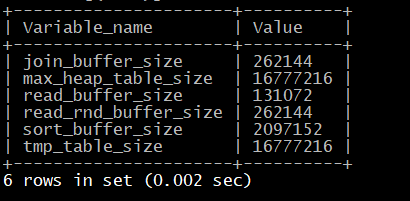
If the values are too large for the available RAM, consider reducing them.
For example, you can evaluate the following settings:
[mysqld]These are example values that must be adapted to the actual workload and application requirements. Before making changes, compare them with the current settings and assess the potential impact.
sort_buffer_size = 2M
join_buffer_size = 2M
read_buffer_size = 1M
read_rnd_buffer_size = 2M
tmp_table_size = 16M
max_heap_table_size = 16M
Reducing tmp_table_size and max_heap_table_size may cause some temporary tables to use disk storage or another storage mechanism instead of memory. This can reduce RAM consumption but may also increase query execution time.
The behavior of internal temporary tables depends on the database version. For example, MySQL 8.0 uses the TempTable mechanism, which is also affected by additional parameters, including temptable_max_ram. MariaDB may use different mechanisms and limits.
Therefore, do not assume that tmp_table_size and max_heap_table_size alone provide complete control over all memory used by temporary tables.
Do not increase these parameters unnecessarily in an attempt to speed up the database. On a server with many connections, doing so can have the opposite effect.
8. Checking Swap Usage
Swap allows Linux to use disk space as additional virtual memory. It does not replace physical RAM and is usually much slower.Check the current swap status:
swapon --show

free -h
To monitor swapping activity, use:vmstat 1 10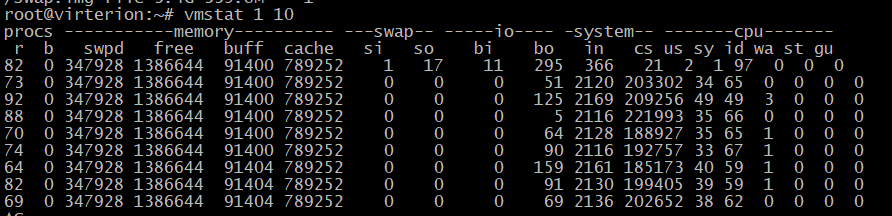
Pay attention to the si and so columns:
- si — the amount of data read from swap into memory.
- so — the amount of data written from memory to swap.
Used swap does not necessarily indicate a problem: Linux may keep infrequently used memory pages there. Current RAM availability, swapping activity, and the impact on application performance are more important.
Do not disable swap on a memory-constrained server without first assessing the consequences, as this may increase the risk of the OOM Killer being triggered.
9. Checking MySQL Process Memory Consumption
To monitor memory usage in real time, run:watch -n 2 'ps -C mysqld -o pid,%mem,rss,vsz,cmd'If you are using MariaDB and the process is named mariadbd, run:watch -n 2 'ps -C mariadbd -o pid,%mem,rss,vsz,cmd'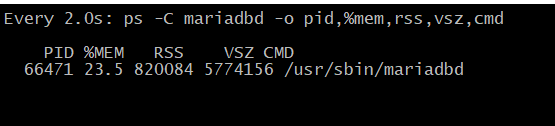
If the command does not display the process, find it using the general process list:
ps aux --sort=-%mem | head -15The fields mean the following:- %MEM — the percentage of physical memory used by the process.
- RSS — the amount of resident memory used by the process, in kilobytes.
- VSZ — the size of the virtual address space; it does not equal actual RAM consumption.
For additional diagnostics, you can use smem, if installed. In MySQL, you can also examine memory statistics through Performance Schema, provided the relevant instrumentation is available and enabled.
Compare MySQL's memory consumption with the server's total memory, active queries, and RAM usage by other applications.
10. Restarting MySQL When Memory Is Critically Low
If the server is already experiencing serious problems and MySQL is unresponsive, first collect the available diagnostic information: RAM status, process list, and error logs.If a restart is necessary, use the appropriate service.
For MySQL:
systemctl restart mysqlFor MariaDB:systemctl restart mariadbAfter restarting, check the service status:systemctl status mysql --no-pagerOr, for MariaDB:systemctl status mariadb --no-pagerThen check memory usage and logs.For MySQL:
free -h

journalctl -u mysql --since "15 minutes ago" --no-pager
For MariaDB:free -h
journalctl -u mariadb --since "15 minutes ago" --no-pagerIf the service fails to start, inspect the error logs and check the configuration. Do not repeatedly restart the service without investigating the cause.A restart may temporarily free memory, but it does not resolve the underlying issue. If the problem is caused by the configuration, resource-intensive queries, or an excessive number of connections, it may occur again.
Do not terminate the process using kill -9 unless absolutely necessary. This is not the standard way to maintain MySQL and does not allow the process to shut down cleanly.
11. When to Increase RAM
Consider increasing the amount of RAM if:- MySQL settings have already been optimized, but available memory is still regularly insufficient.
- The database and web server compete for memory.
- The workload and database size continue to grow.
- Peak numbers of simultaneous connections reflect the application's actual requirements.
- The system regularly uses swap, active swapping is observed, and OOM events are recorded.
If MySQL runs on the same server as the website, account for the combined memory consumption of all components, not just the database buffer pool.
Also check for memory leaks, inefficient queries, and excessive numbers of simultaneously running tasks. Increasing RAM does not always resolve these issues.
Conclusion
If MySQL or MariaDB consumes almost all available RAM, proceed systematically:- Check free -h, top, and the process list.
- Look for OOM Killer messages in system logs.
- Check the innodb_buffer_pool_size and max_connections settings.
- Examine active queries.
- Review buffer sizes and temporary table settings according to the database version.
- Assess swap activity and memory consumption by other applications.
- Make changes gradually and monitor the results.